
Esri ArcGIS integration for Genetec Security Center
-
Physical security operations increasingly rely on spatial context. Combining Genetec Security Center data with an enterprise-grade Geographic Information System (GIS) unlocks richer situational awareness and faster decision-making. Esri's ArcGIS platform is the undisputed leader in geographic information systems and delivers the most advanced mapping and spatial analysis capabilities on the market.
The ADDONXPERT ArcGIS plugin connects Genetec Security Center and ArcGIS through a bi-directional integration in which each platform keeps its role: Security Center remains the source of truth for security entities (cameras, doors, readers, ALPR cameras, intrusion inputs, etc.) and their attributes, while ArcGIS becomes the authoritative system of record for spatial location and mapping, including building floor level on georeferenced floorplans.
• Comprehensive integration: Support both ArcGIS Enterprise (on-premise/hosted) and ArcGIS Online (SaaS).
• Secure delta synchronization: Communication with the ArcGIS REST API at configurable intervals, transferring only the differences between the two systems.
• Automatic entity placement: Automatic placement of Security Center entities on the correct area and map (building, floor) based on ArcGIS location data.
• Automatic creation of areas and maps: Optional generation of areas and maps in Security Center from the ArcGIS data structure.
• Configurable attribute mapping: Mapping between Security Center attributes and ArcGIS feature attributes, with a per-attribute source of truth.
• Logging and diagnostics: Detailed logs, validation messages, dedicated error map for entities that fail synchronization - for easier monitoring and auditing.
• Enterprise-scale deployments: Designed for large installations - up to 100,000 synchronized entities.
• Security Center failover support: The plugin supports automatic failover to a backup server, like any Security Center role.
• Native Security Center integration: The plugin is installed as a standard Security Center role and is fully configured from the Config Tool.
The ArcGIS plugin lets security operators get the best of both worlds: the operational richness of Genetec Security Center and the mapping power of Esri ArcGIS, combined in a smooth, maintainable integration.
Plugin features
Technical diagram
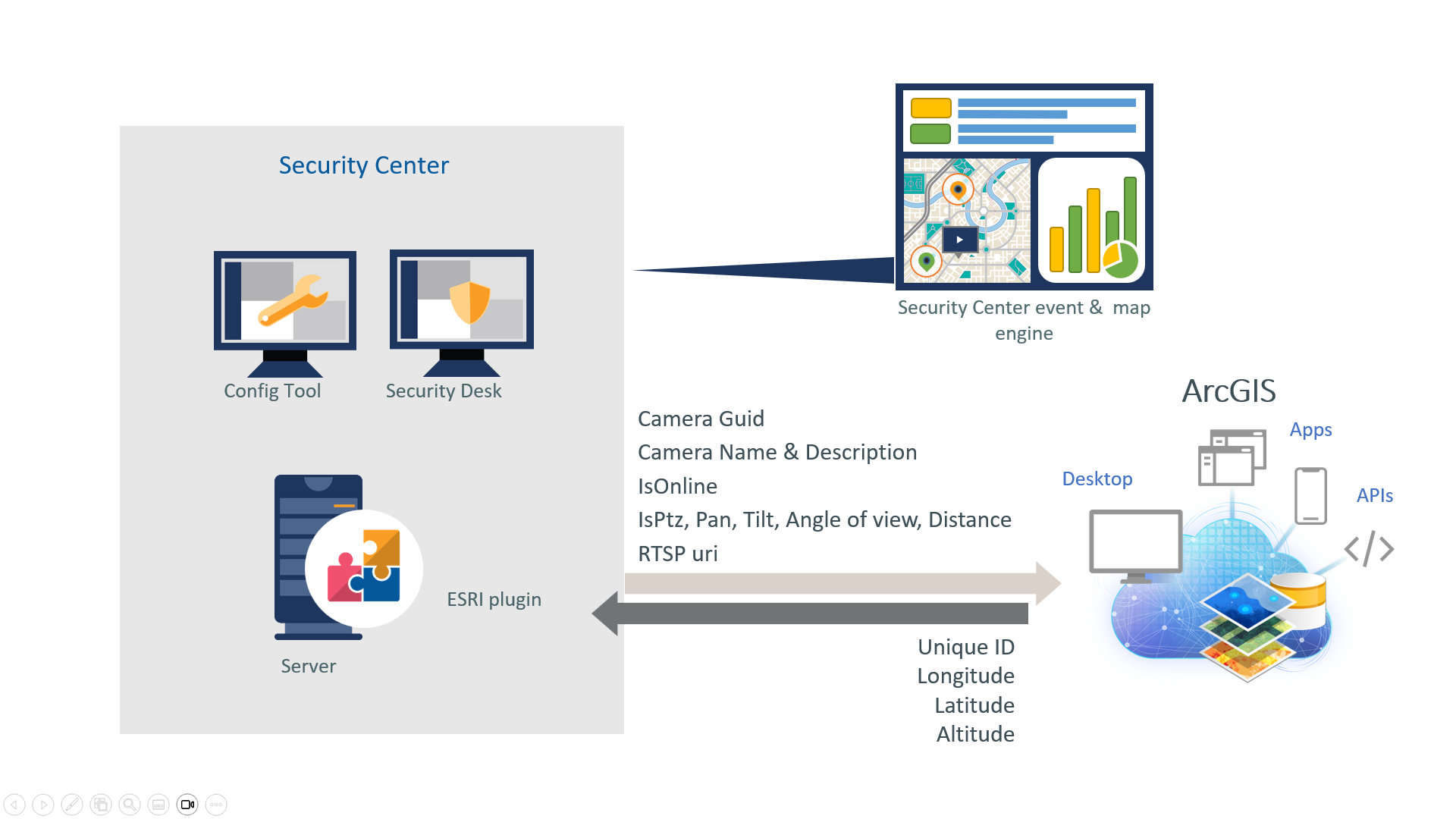
Configuration in Config Tool
-
In the Security Center Config Tool, the ArcGIS plugin is configured in three sections:
- ArcGIS communication: feature server URL, API key, synchronization interval and timeout
- Custom configuration: main Security Center map, errors map
- Field mapping: mapping between Security Center attributes and ArcGIS attributes, with source of truth per attribute
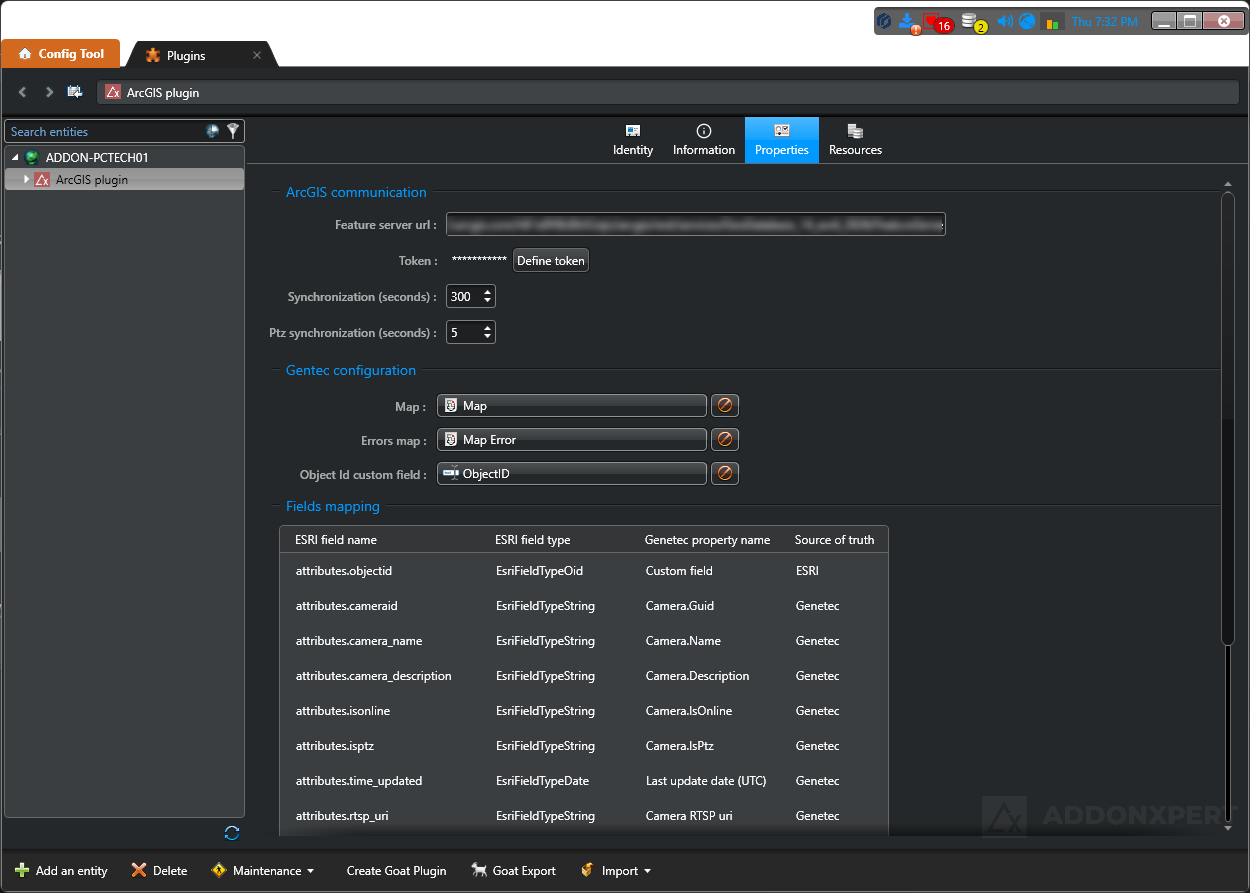
Key features and capabilities
| Feature | Description |
|---|---|
| sync Synchronization | |
| Bi-directional synchronization | Bi-directional communication between Genetec Security Center and ArcGIS via the ArcGIS REST API. |
| Delta synchronization | Only the differences between the two systems are transferred on each cycle, optimizing bandwidth and performance. |
| Configurable interval | Synchronization cadence configurable between 60 and 3600 seconds, with a minimum interval enforced by the plugin. |
| Synchronization timeout | Maximum duration of a synchronization cycle is configurable; a warning is raised if exceeded. |
| map Mapping and positioning | |
| Automatic entity placement | Placement of Security Center entities on the correct area and map (building, floor) based on authoritative geospatial data in ArcGIS. |
| Georeferenced floorplans with floor level | Support for multi-floor georeferenced floorplans managed in ArcGIS. |
| Main Security Center map | Definition of the main map on which synchronized entities are placed. |
| Errors map | Dedicated map receiving entities for which synchronization failed, to facilitate diagnosis. |
| Automatic creation of areas and maps | Optional generation of areas and maps in Security Center from the ArcGIS structure. |
| swap_horiz Attribute mapping | |
| Security Center / Esri ArcGIS mapping | Configurable mapping between Security Center attributes (properties, custom fields) and ArcGIS feature attributes. |
| Per-attribute source of truth | Per-attribute definition of the system that owns the value: Security Center or ArcGIS. Values from the source of truth overwrite the other side. |
| Automatic entity association | Security Center entities are matched to their ArcGIS feature automatically - the ArcGIS ID is managed by the plugin, with no custom field to create or configure. |
| shield Security and connectivity | |
| Secure HTTPS connection | Communication with the ArcGIS feature server exclusively over HTTPS. |
| API Key authentication | Authentication to ArcGIS via an API Key provided by the ArcGIS administrator. |
| bug_report Diagnostics and monitoring | |
| Validation messages | OK, warning and error messages displayed in the Config Tool to reflect the plugin status. |
| Detailed logging | Traces accessible through the Windows Event Viewer and Security Center Trace Recorders. |
| Performance monitoring | Performance monitoring subsystem integrated in the plugin. |
| integration_instructions Genetec integration | |
| Native Security Center role | The plugin is installed as a standard Security Center role and is configured from the Config Tool. |
| Failover support | Automatic failover to a backup server, with a list of servers allowed to run the role. |
| Enterprise-scale deployments | Designed for large installations - up to 100,000 synchronized entities. |
| Security Center compatibility | Compatible with Security Center 5.11, 5.12, 5.13 and 5.14. |
Frequently Asked Questions
Overview
What does the Esri ArcGIS plugin for Genetec Security Center do?
The Esri ArcGIS plugin connects Genetec Security Center to the Esri ArcGIS GIS platform through bi-directional synchronization. It automatically places your security entities (cameras, doors, readers, ALPR, intrusion) on georeferenced ArcGIS maps, including the floor level on georeferenced floorplans.
How does it differ from a simple GIS map displayed in Security Desk?
A simple embedded GIS map is a static image background. The ADDONXPERT ArcGIS plugin provides real-time integration: Security Center and ArcGIS each keep their role as source of truth (SC for security entities, ArcGIS for spatial location), with delta sync, configurable attribute mapping and up to 100,000 entities.
Is the ArcGIS plugin Genetec-certified?
Yes. The ADDONXPERT ArcGIS plugin is Genetec-certified on Security Center 5.13.3.0 and 5.14.0.0.
Compatibility & prerequisites
Which Security Center versions are supported?
Genetec Security Center 5.11, 5.12, 5.13 and 5.14. Official Genetec certifications on 5.13.3.0 and 5.14.0.0. The plugin installs as a native Security Center role with failover support.
Are ArcGIS Online and ArcGIS Enterprise both supported?
Yes. Both platforms are supported: ArcGIS Enterprise (on-premise or hosted) and ArcGIS Online (SaaS), through the ArcGIS REST API with API Key authentication.
Is a specific Esri license required?
Yes. An ArcGIS Named User license (provided by Esri) is required, along with an API Key provided by the ArcGIS administrator for REST API authentication. The ADDONXPERT plugin adds to these licenses.
Is it compatible with Security Center SaaS?
No. The plugin requires an on-premise Security Center deployment because it installs as a native server role. Security Center SaaS is not currently supported.
Features
How does the bi-directional synchronization work?
Delta synchronization at configurable intervals (60 to 3600 seconds). Security Center remains the source of truth for security entities (cameras, doors, readers), ArcGIS remains the source of truth for spatial location and mapping. Only differences are transferred each cycle, optimizing bandwidth.
Which Security Center entities are synchronized?
All main security entities: cameras (fixed and PTZ), doors, readers, ALPR cameras, intrusion inputs, plus their attributes (name, description, custom fields). Attribute mapping between SC and ArcGIS is fully configurable.
How does the per-attribute source of truth work?
Each attribute (name, description, GPS position, custom field...) can be individually configured: either Security Center is authoritative (SC value overwrites ArcGIS) or ArcGIS is authoritative (ArcGIS value overwrites SC). Thus GPS position can be maintained from ArcGIS while the name remains maintained from SC - each team stays in control of its domain.
How many entities can be synchronized?
Up to 100,000 synchronized entities. The plugin is designed for enterprise-scale deployments: smart cities, multi-site campuses, government, defense, energy, transport.
Does the plugin handle multi-floor georeferenced floorplans?
Yes. The plugin supports multi-floor georeferenced floorplans managed in ArcGIS. Security Center entities are automatically placed on the correct building and floor based on ArcGIS spatial data (3D positioning by level).
What happens if an entity fails to synchronize?
A dedicated map for entities in error is available in Security Center. It receives all entities that failed to sync (ArcGIS feature not found, invalid coordinates, etc.) with diagnostic messages. Detailed logs are accessible through Windows Event Viewer and Security Center Trace Recorders.
Licenses
What licenses are required?
GSC-RS-ADDONX-ARCGIS-BASE (Genetec base license, available only with Security Center Enterprise packages) + a mandatory Advantage contract ADV-RS-ADX-ARCGIS-1Y to 5Y + an ArcGIS Named User license from Esri.